

Smart Tech Tips for Everyday Life Made Simple
In today’s digital world, knowing a few smart tech tips can make a huge difference in how efficiently you use your devices. Whether it’s your smartphone or laptop, small adjustments can significantly improve performance, save time, and extend device lifespan. This guide shares practical, easy-to-follow advice designed for everyday users who want better results without needing advanced technical skills.
Why Everyday Tech Knowledge Matters
Technology is deeply integrated into our daily routines, from communication to work and entertainment. However, many users don’t realize how simple habits can affect device performance. Avoidable issues often cause slow phones, short battery life, and lagging laptops. Understanding basic tech maintenance helps you avoid frustration, improve productivity, and ensure your devices run smoothly for longer periods.
How This Guide Will Help You
This guide provides actionable tips that anyone can follow. You don’t need to be a tech expert to apply these strategies. By the end, you’ll know how to speed up your smartphone, extend battery life, discover hidden features, and boost your laptop’s performance. These tips are practical, effective, and designed to deliver noticeable improvements quickly.
How to Speed Up Your Smartphone
A slow smartphone can be frustrating, especially when you rely on it daily. Fortunately, there are simple ways to improve its speed and responsiveness without spending money.
Remove Unnecessary Apps and Files
Over time, smartphones accumulate unused apps, photos, videos, and downloads that take up valuable storage space. This clutter can slow down your device. Start by uninstalling apps you no longer use. Go through your media files and delete duplicates or unnecessary items. You can also use built-in storage management tools to identify large files and remove them easily. Keeping your storage clean ensures smoother performance.
Clear Cache and Optimize Performance
Cached data helps apps load faster, but excessive cache can slow down your device. Regularly clearing the cache from app settings can free up space and improve speed. Additionally, restart your phone periodically to refresh system processes. Some smartphones also offer optimization features that automatically close background apps and free memory, making your device run more efficiently.
You might also like this: Future of Remote Work Technology
Battery Saving Tips for Mobile Devices

Battery life is a major concern for smartphone users. With a few adjustments, you can significantly extend your device’s battery performance throughout the day.
Reduce Background App Activity
Many apps continue to run in the background, consuming battery even when you’re not using them. Check your phone’s battery settings to identify power-hungry apps. Disable background activity for apps that don’t need constant updates, such as games or rarely used services. This simple step can dramatically improve battery life.
Adjust Screen and Power Settings
Your screen is one of the biggest battery consumers. Lowering brightness, enabling auto-brightness, and reducing screen timeout can save a lot of power. Additionally, activating power-saving mode limits background processes and reduces performance slightly to extend battery life. Turning off features like Bluetooth, GPS, and Wi-Fi when not in use also helps conserve energy.
Hidden Smartphone Features You Should Use
Smartphones come packed with powerful features that many users overlook. Learning these hidden tools can enhance your overall experience and make everyday tasks easier.
Useful Android Shortcuts and Settings
Android devices offer a wide range of customization options. You can use gesture controls to navigate faster, split-screen mode to multitask, and quick settings to access important features instantly. Enabling developer options allows you to adjust animation speeds, making your phone feel faster. Additionally, digital wellbeing tools help you monitor and manage screen time effectively.
iPhone Features Most People Don’t Know
iPhones also include several hidden features that improve usability. Back Tap allows you to perform actions by tapping the back of your phone. Focus modes help minimize distractions by filtering notifications based on your activity. You can also use built-in document scanning and text recognition tools to simplify tasks. Exploring these features can make your device more powerful and convenient.
How to Make Your Laptop Faster
A slow laptop can affect productivity, but regular maintenance can keep it running efficiently. You don’t always need new hardware to see improvements.
Disable Startup Programs
Many programs automatically launch when your laptop starts, slowing down boot time and consuming system resources. Open your task manager or system settings to review startup programs and disable unnecessary ones. This reduces load on your system and helps your laptop start faster.
Clean Storage and Update System
Just like smartphones, laptops need regular storage cleanup. Delete temporary files, uninstall unused software, and organize your data. Keeping your operating system and software updated is equally important, as updates often include performance improvements and security fixes. Running disk cleanup tools and checking for malware can also enhance speed and stability.
You might also like this: Metaverse Technologies
Simple Ways to Fix Internet Problems

Internet issues can be frustrating, especially when you rely on a stable connection for work, study, or entertainment. The good news is that many common problems have simple solutions that you can apply without technical expertise. Understanding the basics of troubleshooting can help you quickly restore your connection and improve overall performance.
Improve WiFi Speed at Home
Improving WiFi speed at home often starts with your router placement. Keep your router in a central location, away from walls and electronic interference like microwaves or televisions. Elevating the router can also help distribute signals more evenly. Another effective step is updating your router firmware to ensure it runs efficiently.
You can also limit the number of connected devices, as too many users can slow down your network. Switching to a less crowded WiFi channel or upgrading to a dual-band router can significantly boost speed. Additionally, using strong passwords prevents unauthorized users from consuming your bandwidth.
Common Reasons for Slow Internet
Slow internet can be caused by several factors. One common reason is network congestion, especially during peak usage hours. Outdated hardware, such as old routers or modems, can also limit speed. Background downloads, streaming, or large file transfers may consume bandwidth without you realizing it.
Another issue could be your internet service plan, which may not provide enough speed for your needs. Malware or unnecessary applications running in the background can also affect performance. Identifying these causes helps you take targeted actions to restore faster internet.
Essential Browser Tips for Better Browsing
Your web browser plays a key role in your online experience. Optimizing it can improve speed, enhance productivity, and reduce frustration during daily tasks.
Use Extensions for Productivity
Browser extensions are powerful tools that can boost productivity and simplify tasks. You can install extensions for ad blocking, password management, note-taking, and time tracking. These tools help streamline your workflow and reduce distractions.
However, it’s important to avoid installing too many extensions, as they can slow down your browser. Regularly review and remove unused ones to maintain optimal performance. Choosing trusted and well-reviewed extensions ensures both efficiency and security.
Clear Cache for Faster Loading
Over time, your browser stores cached data to load websites faster. While this can be helpful, excessive cache can cause slow loading or display outdated content. Clearing your browser cache periodically helps refresh data and improve speed.
You should also clear cookies and browsing history occasionally to maintain privacy and performance. Restarting your browser after clearing the cache can further enhance responsiveness and ensure smoother browsing.
Must-Know App Tips for Daily Use
Mobile apps are an essential part of daily life, but managing them properly can improve both performance and user experience. Small adjustments can make a big difference in how efficiently your apps function.
Manage Notifications Smartly
Constant notifications can be distracting and reduce productivity. Managing notifications allows you to focus on what matters most. Disable alerts for non-essential apps and prioritize important ones like messaging or work-related tools.
Most smartphones offer notification settings that let you customize alerts, sounds, and display options. Using features like “Do Not Disturb” during specific hours can help you maintain a healthy balance between connectivity and focus.
Save Storage in Social Media Apps
Social media apps often consume large amounts of storage due to cached images, videos, and downloads. Regularly clearing app cache can free up space and improve performance. You can also adjust settings to reduce automatic media downloads.
Using lighter versions of apps or accessing platforms through a browser can save storage and data usage. Deleting old media files and limiting high-resolution uploads also helps keep your device running smoothly.
You might also like this: Embedded Systems Development UK
Online Security and Privacy Tips
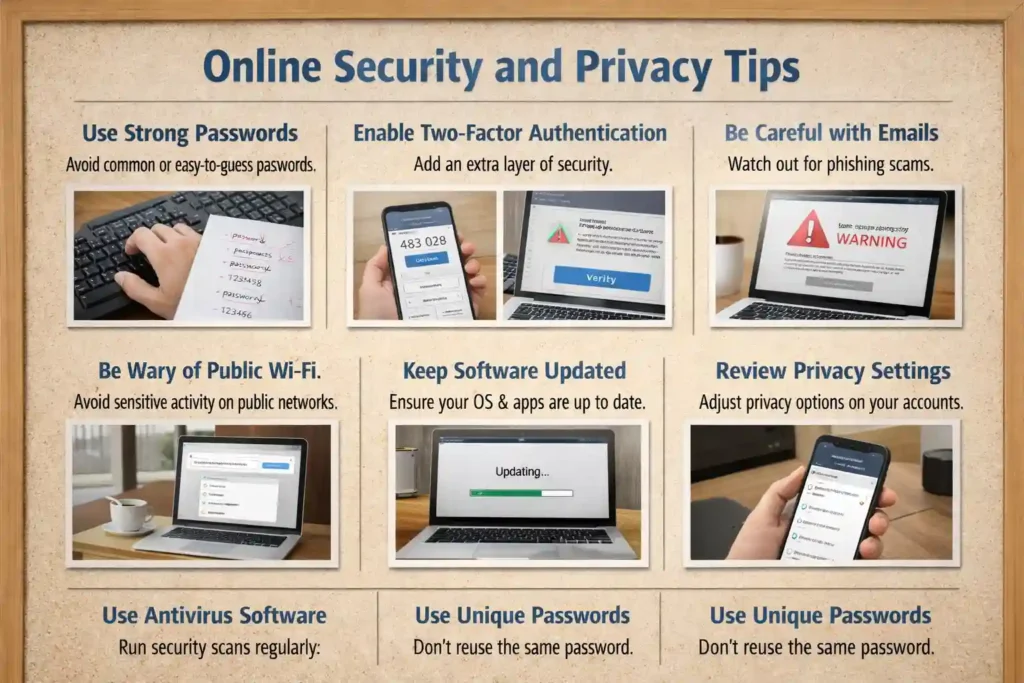
Staying safe online is more important than ever. With increasing digital threats, adopting basic security practices can protect your personal information and prevent unauthorized access.
Protect Your Accounts from Hackers
Strong passwords are your first line of defense. Use unique passwords for each account and include a mix of letters, numbers, and symbols. Enabling two-factor authentication adds an extra layer of security, making it harder for hackers to gain access.
Avoid logging into accounts on public or unsecured networks. Regularly updating your passwords and monitoring account activity can help you detect suspicious behavior early and take action before any damage occurs.
Avoid Online Scams and Phishing
Online scams and phishing attacks are becoming more sophisticated. Be cautious of emails, messages, or links that ask for personal information. Always verify the source before clicking on any suspicious link.
Look for signs such as poor grammar, urgent requests, or unfamiliar senders. Avoid downloading attachments from unknown sources. Using antivirus software and keeping your devices updated can also help protect against threats.
Useful Tech Tools for Everyday Life
Technology can simplify daily tasks when used wisely. With the right tools, you can save time, stay organized, and improve efficiency without much effort. From AI-powered assistants to productivity apps, modern tech offers countless ways to enhance your routine.
Free AI Tools You Can Use Daily
Free AI tools have become increasingly popular for everyday use. These tools can help you write emails, generate ideas, summarize content, and even assist with learning new skills. Many AI platforms offer basic versions at no cost, making them accessible to everyone.
You can use AI for tasks like drafting messages, organizing schedules, or researching topics quickly. These tools reduce manual effort and help you focus on more important activities. The key is to use them responsibly and verify important information when needed.
Productivity Apps That Save Time
Productivity apps are essential for managing daily responsibilities. From task managers to note-taking apps, these tools help you stay organized and efficient. You can create to-do lists, set reminders, and track progress easily.
Calendar apps also play a crucial role in planning your day effectively. Time-tracking tools can help you understand how you spend your time and identify areas for improvement. Choosing simple and user-friendly apps ensures consistency and better results.
Common Tech Mistakes to Avoid
While technology is helpful, certain mistakes can reduce performance and create unnecessary problems. Being aware of these common issues can help you avoid frustration and keep your devices running smoothly.
Ignoring Software Updates
One of the biggest mistakes users make is ignoring software updates. Updates are not just about new features; they also fix bugs and improve security. Skipping updates can leave your device vulnerable to threats and reduce performance.
Always enable automatic updates or check for updates regularly. Keeping your system up to date ensures better compatibility, improved speed, and stronger protection against potential risks.
Overloading Devices with Apps
Installing too many apps can slow down your device and consume storage space. This can lead to lagging performance and shorter battery life.
It’s important to review your apps regularly and remove those you no longer need. Keeping only essential apps helps maintain speed and ensures your device functions efficiently.
You might also like this: How Technology Shapes Our Daily Lives in 2026
Smart Digital Habits for Better Productivity
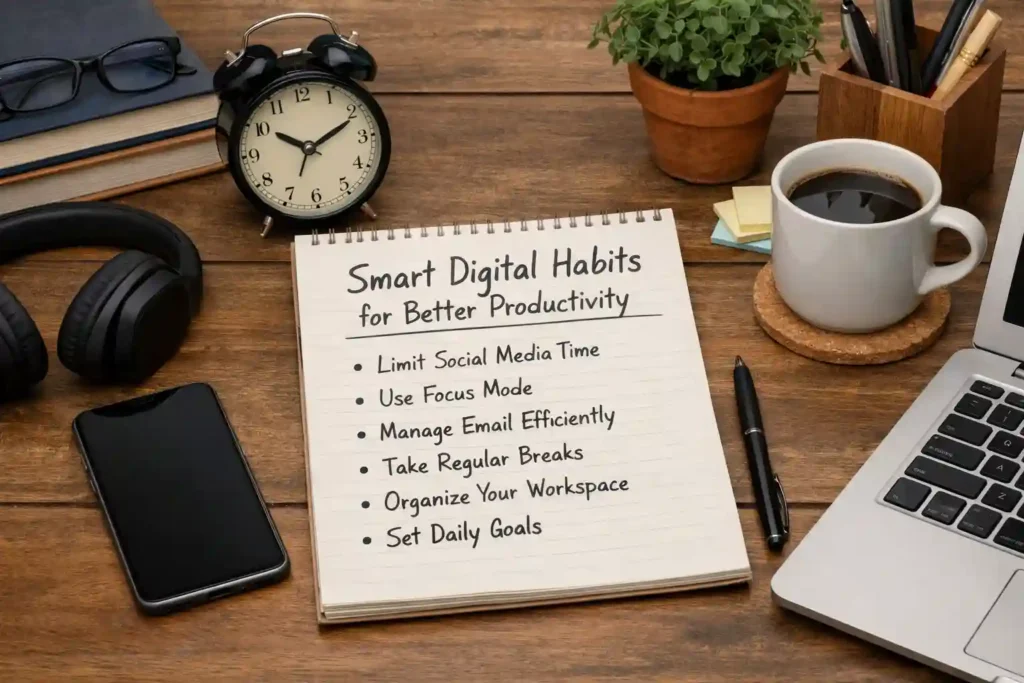
Developing smart digital habits can significantly improve your productivity. Small changes in how you use technology can lead to better focus, organization, and time management.
Organize Your Files and Data
A cluttered digital space can make it difficult to find important files. Organizing your data into folders and using clear naming systems can save time and reduce stress. Regularly deleting unnecessary files also helps free up storage.
Cloud storage services can be useful for backing up important data and accessing it from multiple devices. Keeping your files organized ensures a smoother workflow and prevents data loss.
Reduce Screen Time Effectively
Excessive screen time can affect both productivity and well-being. Setting limits on app usage and taking regular breaks can help maintain a healthy balance. Many devices offer built-in tools to monitor and control screen time.
You can also create tech-free zones or schedule specific times for digital activities. Reducing unnecessary screen time allows you to focus on meaningful tasks and improves overall efficiency.
Frequently Asked Questions (FAQs)
What are smart tech tips for everyday life?
Smart tech tips include simple strategies to improve device performance, save time, and enhance productivity. These may involve organizing files, updating software, managing apps, and using helpful tools effectively.
How can I make my phone faster without apps?
You can speed up your phone by deleting unused files, clearing cache, restarting the device, and disabling unnecessary background processes. Keeping storage free and updating software also improves performance.
Why is my internet so slow, even with good speed?
Slow internet can result from network congestion, too many connected devices, or background activity. Router placement, outdated hardware, and interference can also affect performance despite having a good plan.
How do I keep my devices safe from hackers?
Use strong passwords, enable two-factor authentication, and avoid suspicious links. Regular updates, antivirus software, and secure networks also help protect your devices from threats.
What are the best free tech tools for daily use?
Some of the best free tools include note-taking apps, task managers, cloud storage services, and AI-based assistants. These tools help improve productivity, organization, and efficiency in daily tasks.
Conclusion: Start Using Smart Tech Today
Adopting smart tech habits can transform how you use your devices every day. By choosing the right tools, avoiding common mistakes, and building better digital routines, you can improve productivity and reduce stress. Start applying these simple tips today to enjoy a smoother, more efficient digital experience.