

Pxless: Reliable AI Image Editor for Creative Professionals
Pxless is an AI image editing platform designed for creative professionals, marketers, online sellers, and content creators who need fast and accurate image enhancement tools. The platform utilizes artificial intelligence to automate complex editing tasks that typically require specialized technical skills and expensive software. With a simple interface and automation features, Pxless helps users create polished visuals without spending hours on manual editing.
Unlike traditional editing applications, Pxless focuses on speed, convenience, and precision. Users can improve product images, social media graphics, portraits, and promotional materials in just a few clicks. The platform combines AI technology with user-friendly controls, making it suitable for beginners. Businesses and freelancers often rely on Pxless to produce professional visuals while maintaining efficiency and consistency across multiple projects.
How Pxless Simplifies Image Enhancement
Pxless simplifies image enhancement by automating repetitive editing processes. Instead of manually adjusting brightness, removing backgrounds, or correcting imperfections, users can rely on AI-powered tools that deliver instant results. The software analyzes uploaded images and applies smart improvements based on the subject, lighting, and overall quality.
This streamlined workflow allows creators to focus more on creativity rather than technical editing steps. Whether someone wants to sharpen details, improve colors, or clean up distracting elements, Pxless provides quick solutions that reduce editing time significantly. The platform also minimizes errors that often occur during manual editing, helping users maintain results with minimal effort.
Key Features of Pxless
AI-Powered Background Removal
One of the most popular features of Pxless is its AI-powered background removal tool. This feature automatically detects subjects within an image and removes unwanted backgrounds with accuracy. It is especially useful for e-commerce businesses, photographers, and social media marketers who require clean product photos.
The automation process saves time while producing sharp cutouts that look natural. Users can replace backgrounds, create transparent images, or customize visuals for branding purposes without advanced editing knowledge.
Smart Retouching and Enhancement Tools
These tools can smooth skin, adjust lighting, enhance colors, and sharpen details without making photos appear artificial. AI technology carefully balances edits to maintain a natural appearance.
Creative professionals often use these features to prepare images for advertising campaigns, online stores, and digital portfolios.
One-Click Editing Capabilities
Another major advantage of Pxless is its one-click editing functionality. Users can apply automatic enhancements with a single action, making the platform convenient for fast-paced projects. This feature is ideal for individuals managing large image collections or tight deadlines.
The one-click system improves productivity while maintaining consistent editing quality across visuals. It also helps beginners create professional-looking content without requiring extensive design experience.
You might also like: AI Agents Are Automating Entire Business Workflows
How Pxless Works
Uploading and Processing Images
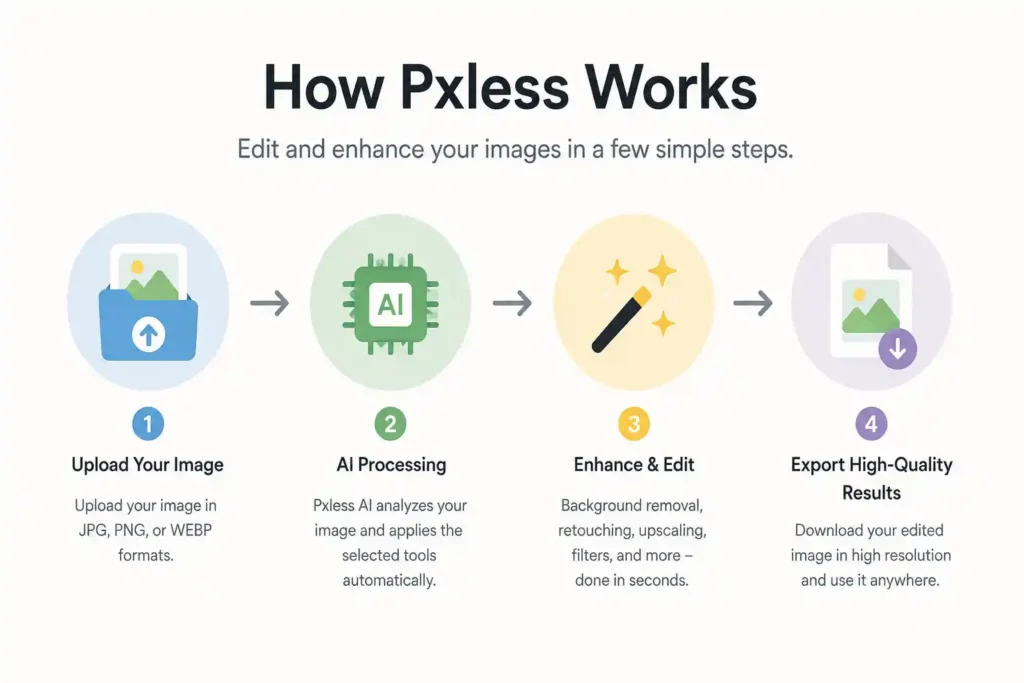
Using Pxless is simple and efficient. Users begin by uploading images directly to the platform. After the upload process is complete, the AI system analyzes each image and applies intelligent editing adjustments based on the selected tools and preferences.
The platform supports smooth processing speeds, allowing users to edit multiple images quickly. This efficiency makes Pxless a practical solution for agencies, online businesses, and freelance creators handling high volumes of visual content daily.
Exporting High-Quality Results
Once editing is complete, users can export their images in high-quality formats suitable for websites, social media platforms, marketing campaigns, and print projects. Pxless ensures that edited visuals maintain sharpness and clarity during the export process.
The ability to produce professional-quality results quickly makes the platform valuable for businesses and creators who depend on strong visual presentation to attract audiences and improve engagement online.
Benefits of Using Pxless
Saves Time for Creative Professionals
Pxless helps creative professionals save time by automating complex editing tasks. Designers, photographers, and marketers can complete projects faster without sacrificing quality. The AI-powered workflow reduces manual effort and improves productivity.
Improves Editing Accuracy and Consistency
The platform also improves editing accuracy and consistency across multiple projects. Automated tools minimize human error while maintaining uniform visual quality. This consistency is essential for branding, marketing campaigns, and professional presentations that require polished and reliable images.
Pxless for Different Users
Graphic Designers and Agencies
Pxless is designed to support graphic designers and creative agencies that handle large editing workloads daily. Designers often need fast tools to improve images, remove backgrounds, and create polished visuals for branding campaigns. Pxless simplifies these tasks with AI automation, helping professionals complete projects faster without sacrificing quality.
Creative agencies also benefit from the platform because it improves workflow efficiency. Teams can edit multiple files quickly while maintaining a consistent design style across campaigns. Instead of spending hours on repetitive editing work, agencies can focus more on creativity and client strategy.
E-commerce Store Owners
E-commerce store owners rely heavily on high-quality visuals to attract buyers and increase conversions. Pxless provides useful tools for creating professional product images without hiring expensive editors or photographers. Store owners can remove backgrounds, improve lighting, and sharpen product details in only a few clicks.
This makes product listings look cleaner and more attractive on online marketplaces and websites. Consistent product photos also improve brand credibility and customer trust. Since many online businesses upload large numbers of product images regularly, the automation features within Pxless save valuable time and improve productivity.
Social Media Content Creators
Social media creators need visually appealing content to capture audience attention and increase engagement. Pxless allows influencers, marketers, and content creators to edit images quickly for platforms such as Instagram, TikTok, and Facebook. The platform helps users produce eye-catching visuals that match current digital trends.
Creators can apply filters, retouch portraits, and improve image quality without advanced editing skills. Fast editing tools are especially useful for creators who post content daily and manage multiple campaigns at once. Pxless supports creative freedom while helping users maintain consistent branding across social media channels.
You might also like: AI Business Tools Every Startup Should Know About
Pxless AI Editing Tools Explained
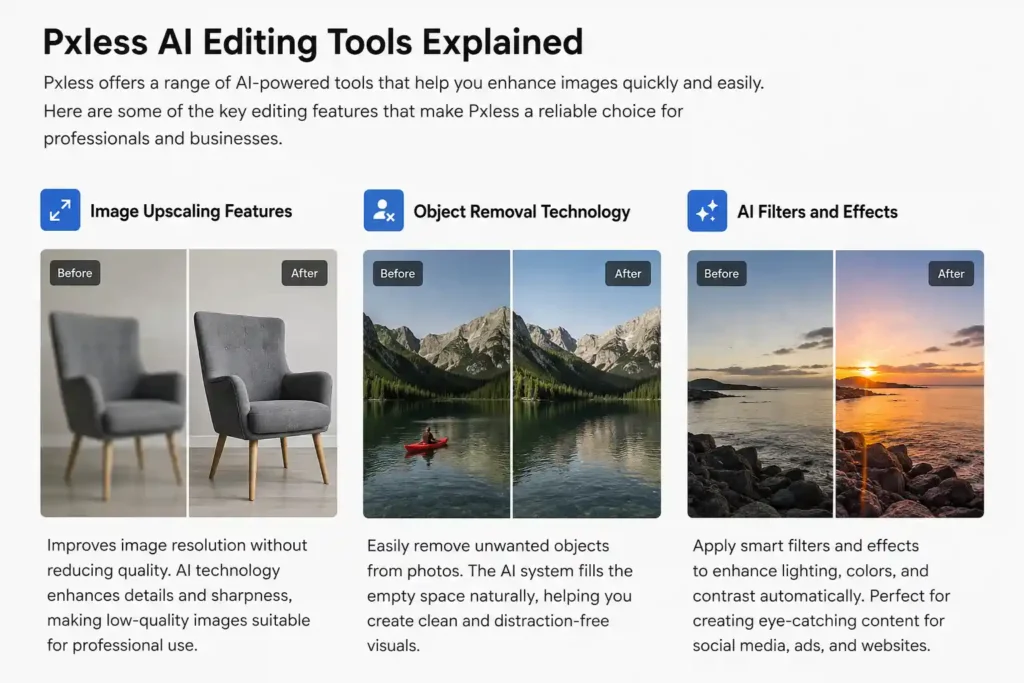
Image Upscaling Features
The image upscaling feature in Pxless improves image resolution without significantly reducing quality. AI technology analyzes image details carefully and increases clarity while preserving textures and sharpness.
Users can upgrade low-quality visuals into professional-looking images suitable for digital marketing and commercial use.
Object Removal Technology
Pxless also includes object removal technology that allows users to erase unwanted elements from photos. The AI system intelligently fills empty spaces to create natural-looking results. This feature helps improve product photos, portraits, and promotional graphics without requiring manual editing experience.
Designers and marketers often use object removal tools to eliminate distractions from images and maintain cleaner compositions. The process is fast, accurate, and suitable for both beginners and professionals.
AI Filters and Effects
AI filters and effects give users the ability to transform visuals quickly with modern editing styles. Pxless offers smart enhancements that improve lighting, colors, contrast, and overall image appearance automatically. These filters help users create professional content for websites, social media, and digital advertisements.
The platform balances creative effects while preserving image quality, allowing creators to achieve polished results with minimal effort.
Pxless Pricing and Plans
Free vs Paid Features
Pxless offers both free and paid plans for different user needs. The free version includes basic editing features suitable for casual users and beginners. Paid plans provide advanced tools, faster processing speeds, and access to premium AI editing capabilities.
Businesses and professionals usually choose paid subscriptions because they require higher-quality exports and additional editing flexibility.
Which Plan Is Best for Professionals?
Professional users often benefit most from premium Pxless plans because they include advanced automation tools and enhanced processing support. Agencies, marketers, and online businesses can manage larger editing tasks efficiently while maintaining high-quality standards.
Pxless Pros and Cons
Major Advantages of the Platform
Pxless provides fast editing speeds, user-friendly controls, and reliable AI-powered automation. The platform improves productivity and helps users create professional visuals with minimal effort.
Limitations Users Should Know
Although Pxless offers many advantages, some advanced designers may still prefer manual editing software for detailed customization. Certain premium tools may also require paid subscriptions for full access. Its simple interface also helps beginners learn professional editing techniques without unnecessary confusion, quickly.
You might also like: AI Productivity Platforms Are Becoming Essential for Teams
Pxless vs Other AI Image Editors
Comparison With Canva AI
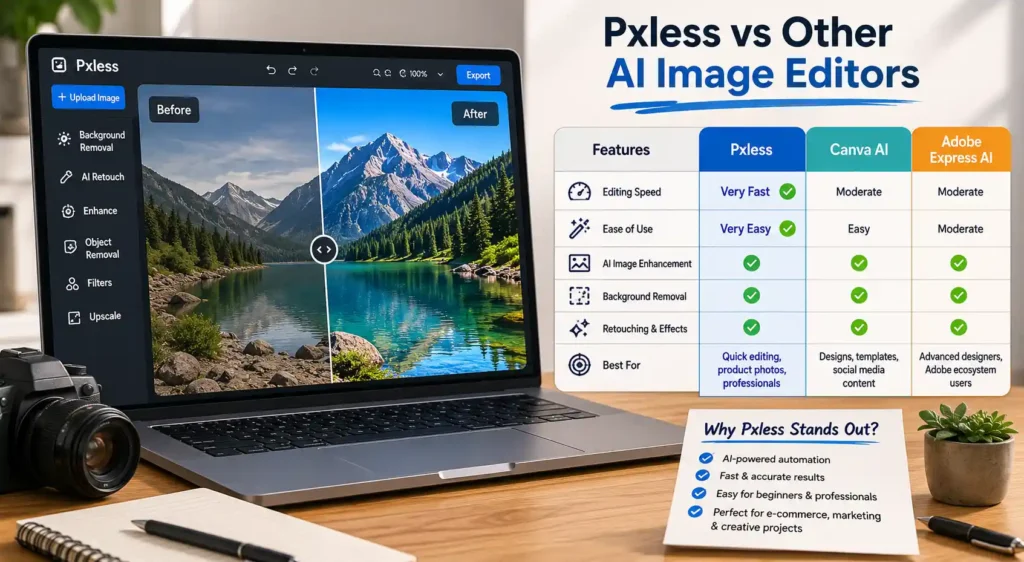
Pxless competes with several AI image editing platforms, including Canva AI. While Canva AI focuses heavily on templates, graphic design layouts, and social media content creation, Pxless places stronger attention on automated image enhancement and editing precision. Users who primarily need quick photo improvements, background removal, and AI retouching tools may find Pxless more efficient for dedicated editing tasks.
Canva AI is ideal for users creating presentations, marketing banners, and visual content with drag-and-drop tools. However, Pxless offers a more streamlined workflow for people who want advanced image enhancement without navigating complex design features. The platform is especially useful for online sellers, photographers, and agencies that require consistent editing quality.
Another advantage of Pxless is its speed. AI automation helps users process images quickly while maintaining professional results. Canva AI remains a versatile design platform, but Pxless appeals more to users focused on image optimization and automated editing efficiency.
Comparison With Adobe Express AI
Adobe Express AI is another popular competitor in the AI editing market. Adobe provides advanced creative tools and integration with other Adobe products, making it attractive for experienced designers. However, Pxless is often considered easier to use for beginners and professionals seeking faster editing solutions.
Pxless simplifies complicated editing tasks through automation. Users can improve images, remove unwanted objects, and apply enhancements with minimal effort. Adobe Express AI includes powerful features, but some users may find the interface more technical compared to the cleaner workflow available on Pxless.
For businesses and creators looking for quick editing without extensive training, Pxless delivers a balanced combination of speed, simplicity, and reliable AI-powered performance.
Is Pxless Safe and Legit?
Data Privacy and Security
Many users want to know whether Pxless is safe before uploading personal or professional images. The platform focuses on maintaining user privacy and protecting uploaded content through secure processing systems. Strong security practices are important for photographers, agencies, and businesses handling sensitive visual materials.
Pxless also aims to provide a secure editing experience by limiting unnecessary access to uploaded files. This approach helps users feel more confident when managing projects online. Although users should always review official policies carefully, the platform appears to prioritize privacy and responsible image handling.
User Reviews and Online Reputation
Online reviews and user feedback play a major role in determining whether a platform is trustworthy. Pxless has gained attention among creators and marketers because of its user-friendly design and editing speed. Many users appreciate the automation features that reduce manual editing time significantly.
Positive reviews often highlight the platform’s convenience, accessibility, and ability to produce professional-quality visuals quickly. Like most digital tools, some users may prefer additional customization features, but overall feedback generally supports Pxless as a reliable AI image editing solution.
Frequently Asked Questions
Is Pxless Free to Use?
Pxless offers a free version with basic editing tools for beginners and casual users. Premium plans provide advanced AI features and additional editing capabilities.
Can Beginners Use Pxless Easily?
Yes, Pxless is designed with a simple interface that allows beginners to edit images without technical experience or professional training.
Does Pxless Support High-Resolution Images?
Pxless supports high-resolution image exports, making it suitable for websites, online stores, social media campaigns, and professional marketing projects.
Is Pxless Good for Professional Editing?
Professional users can benefit from Pxless because it combines AI automation with fast processing and reliable editing quality for commercial content creation.
You might also like: Caricatronchi: Modern Digital Caricature Art Platform Online
Conclusion
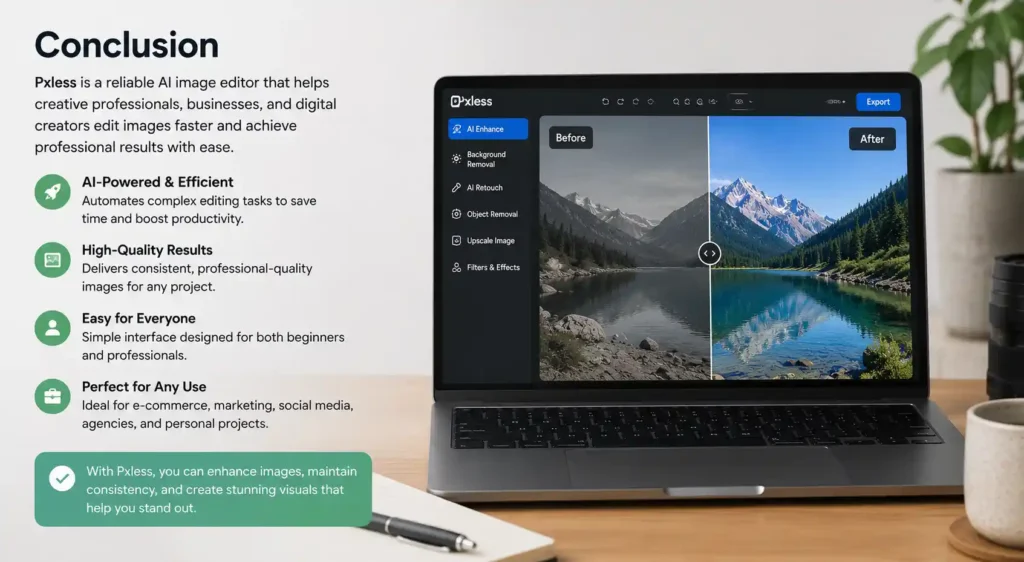
Pxless continues to grow as a reliable AI image editor for creative professionals, businesses, and digital creators seeking faster workflows and professional results. The platform combines intelligent automation, user-friendly controls, and modern editing capabilities to simplify image enhancement tasks. Compared to Canva AI and Adobe Express AI, Pxless stands out for its streamlined editing experience and strong focus on image optimization. Whether users need quick background removal, AI retouching, or professional-quality exports, Pxless offers practical solutions that improve productivity and consistency. Its accessibility makes it suitable for beginners, while its automation tools provide value for agencies, marketers, and online businesses managing large volumes of visual content daily with ease.