
Softaken OST to PST Converter Review Features Pricing Pros
Handling inaccessible OST files can be a challenge for Outlook users. Whether caused by Exchange Server failures, corrupted profiles, accidental account deletion, or system crashes, retrieving mailbox data often requires specialized tools. In this review, we evaluate Softaken OST to PST Converter and examine its features, performance, pricing, and limitations.
In this full review, we will see the complete review of the Software. If you’re searching for a trustworthy solution in 2026, this review will help you determine whether the software is the right option for you.
What Is an OST File?
OST stands for Offline Storage Table. Microsoft Outlook automatically creates OST files when users configure Outlook with:
- Microsoft Exchange Server
- Microsoft 365 or IMAP mail accounts
These files provide a synchronised offline copy of mailbox data, so that users can access their email, contacts, tasks, calendars, journals,, and attachments even when offline.
However, OST files are directly linked to the Outlook profile and Exchange account that created them. If the connection breaks, the OST file may become inaccessible or orphaned.
Common Reasons for OST Corruption and Inaccessibility:
- Exchange Server goes down
- Outlook sync problems
- Mailbox deleted accidentally
- Outlook profile corruption
- Hard drive failures
- Virus/malware attacks
- System failure
- Reinstallation of Outlook
- Change password
- Moving to another device
As the Outlook application does not allow the direct opening of orphaned OST files, users generally need a professional OST to PST converter program.
Why Convert OST to PST?
PST (Personal Storage Table) files are portable Outlook data files that can be easily imported into multiple Outlook profiles or systems.
Advantages of OST to PST Conversion are:
Basic Mailbox Backup
PST files can be stored externally for long-term backup and archiving.
Outlook migrations
Users can move mailbox data from one machine to another without Exchange Server requirements.
Recover Inaccessible Mailboxes
Mailbox data is available after PST conversion even if the Exchange Server is not online.
Legal and Regulatory Requirements
Organisations typically archive emails to PST or PDF format for audit and regulatory compliance purposes.
Orphaned OST files Access
Users can retrieve data from deleted or inaccessible Outlook accounts.
Overview of Softaken OST to PST Converter
Softaken OST to PST Converter is a tool designed to convert OST files into PST and other formats. It supports recovery from corrupted or orphaned OST files, selective mailbox export, and batch conversion. The software targets both individual and business users who need access to inaccessible mailbox data.
The Tool Supports:
- Corrupt OST file recovery
- Conversion of orphaned OST
- Batch processing
- Selected mailboxes export
- Converting large files
- Various export formats
- Recover Emails, Contacts, Calendars, Notes, Journals & Attachments
It has a simple interface and is lightweight, making it perfect for both technical and non-technical users.
Key Features of Softaken OST Converter
1. Repair Corrupted & Orphaned OST Files
The software provides Quick Scan for slightly corrupted files and Advanced Scan for severely damaged OST files. This ensures maximum recovery of mailbox content in most scenarios.
2. Preview Mailbox Data for Export
Users can preview emails, attachments, contacts, calendars, tasks, and deleted items. This allows selective export.
3. Data Integrity
Original email formatting, attachments, folder hierarchy, timestamps, and metadata (To, CC, BCC fields) are preserved during conversion.
4. Multiple Export Formats Support
The software is mostly developed for PST conversion, but also supports certain other formats.
Supported export file types
E-mail Formats:
PST, MSG, MBOX, EML, EMLX, NSF, TGZ, etc.
Document formats:
PDF, HTML
Contact and Calendar formats
VCF (vCard), CSV, ICS
5. Batch Convert OST File
Business and Enterprise editions support batch processing, enabling multiple OST files or folders to be converted simultaneously.
This is a very useful tool for IT administrators managing Outlook business setups.
6. Large OST File Support
Softaken OST to PST Converter can handle big OST files without any serious issues with performance.
During the testing, the software was able to manage:
- 5GB Mailbox Files
- 40GB+ Corrupted OST Files
- 100GB Mailbox Files
The application remained stable during the conversion procedure, and a larger file takes some time, about 15-20 minutes.
7. Selective Mailbox Export
Users can pick specific items for export instead of converting the full mailbox:
- Particular folders
- Personal emails
- Specific date ranges
- This saves storage space and conversion time.
You might also like: Dihward: smart digital workflow and automation platform tool
Real-World Use Cases
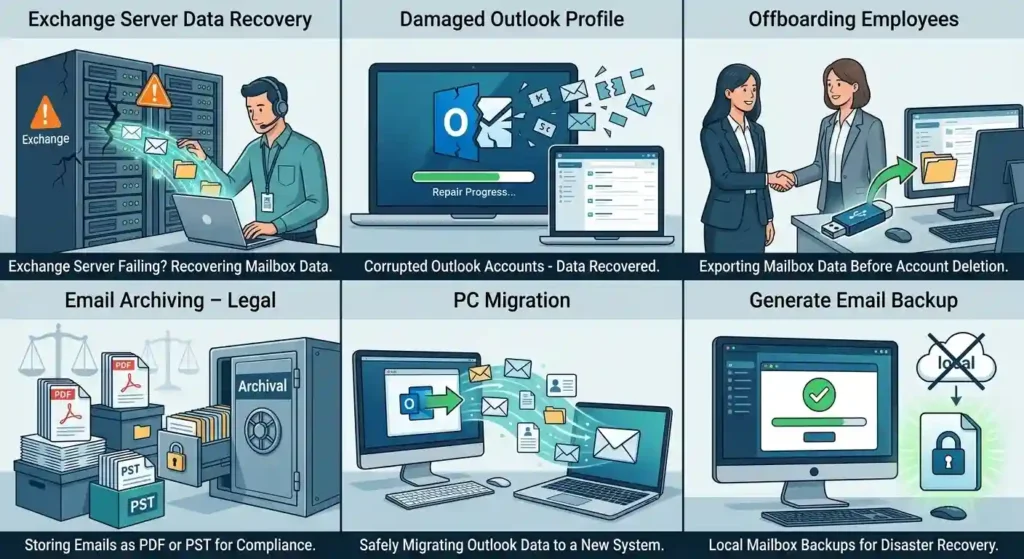
Exchange Server Data Recovery
Exchange Server failing or crashing? Recover mailbox data.
Damaged Outlook Profile
Recover mailbox data of corrupted Outlook accounts.
Offboarding Employees
Export the employee mailbox data before deleting the account.
Email Archiving – Legal
Store emails as PDF or PST for compliance.
PC Migration
Safely migrate Outlook mailbox data to the new system.
Generate Email Backup
Local mailbox backups for disaster recovery.
Ease of Use & User Interface
The application interface is simple and easy to use for beginners.
This is normally done in four simple steps:
- Add an OST file
- Download mail data
- Preview goods that can be recovered
- Export to preferred format
Even non-technical individuals can convert OST without any hassle.
Speed and performance of conversion
Performance is one of the most crucial features in any software.
While Testing:
- Healthy OST files converted fast
- Files that are corrupted require a deeper scan
- Folder hierarchy maintained
- Attachments were saved correctly
- Conversion Speed Conversion speed is a function of:
- OST file size
- Level of corruption
- Hardware system
- Export format selected
- The software was stable and didn’t crash while converting huge files.
Security & Data Privacy
When handling sensitive mailbox information, data privacy is a key problem. One of the advantages of Softaken OST to PST Converter is the offline conversion process. The mailbox data is handled on the user’s computer and not uploaded to external servers.
Additional Security Benefits:
- Read-Only Convert mode
- Original OST files not modified
- Safe handling of attachments and metadata
- Less chance of unintended data corruption
That makes the product ideal for enterprises with strict privacy requirements.
Operating System Requirements
Supported Operating Systems
- Windows 11
- Windows 10
- Windows 8
- Windows 7
- Windows Server editions
Outlook Compatibility
Supports mailbox data from:
- Outlook 2021
- Outlook 2019
- Outlook 2016
- Outlook 2013
- Older Outlook versions
System Requirements
Ram: 4GB Minimum
Hard Disk: 500MB Free Space
The lightweight requirements make the software accessible for home users and enterprise environments alike.
Pricing and License Options
Softaken OST to PST Converter offers multiple licensing options depending on user requirements. License Types.
| Personal License | $49 | Install on 1 PC |
| Home License | $69 | Install on 2- 20 PC |
| Business License | $199 | Install in 10 – 50 |
| Enterprise License | $299 | Install on 50+ PC |
The software uses a one-time payment model instead of recurring monthly subscriptions.
Free Demo Version
There’s a free demo version to try.
The demo version provides the user with:
- Scan OST Files Free
- Preview mailbox content
- Evaluate the functionality of the software
However, the trial edition only allows you to export 25 items per folder.
Pros & Cons
Pros
- Easy-to-use interface
- Supports recovery of orphaned and corrupt OST
- Preserves folder structure and metadata
- Various export formats
- Support for batch conversion
- Can handle big OST files
- Privacy Boost for Offline Conversion
Cons
- Certain advanced features require a paid license.
Softaken OST to PST Converter vs Other OST Converter Tools
| Feature | Softaken | Typical Free Tools |
| Corrupted OST Recovery | Yes | Limited |
| Batch Conversion | Yes | Rare |
| Multiple Export Formats | Yes | Limited |
| Large File Support: | Yes | Often unstable |
| Data Integrity Preservation | Strong | Variable |
| Technical Support | Available | Unavailable |
| Offline Conversion | Yes | Not always |
Compared to many free OST converter tools, Softaken provides better stability, advanced recovery capability, and more export flexibility.
Final Verdict
Softaken OST to PST Converter is a capable tool for converting and recovering inaccessible OST files. It provides multiple export formats, maintains data integrity, supports batch conversion, and performs offline processing. While the interface could be modernized and large files may take time, the software is suitable for IT admins, Outlook specialists, and users needing access to critical mailbox data.